Windows · Free and open source

BOAR, now on your computer.

The same offline AI as the Android app, as a Windows program. You ask, it searches its own library and answers with the source. Once it's set up, it needs no internet, and nothing leaves the machine.

Latest version · Windows 10 and 11, 64-bit · 122 MB · All versions and checksums

Offline after setupRuns on the PC's GPUNo accountMIT license

8:42 pmA quiet evening. You have a question.

8:43 pmThen the internet goes out.

8:43 pmBOAR doesn't notice. It answers from the library on your computer, with the source.

Your libraryEvery pack you add makes it know more, and the boar grows up.

Watched folderDrop a file in a folder you chose. A minute later, you can ask about it.

Free · Windows 10 and 11Works with the internet off. For as long as you need.
Download for Windows

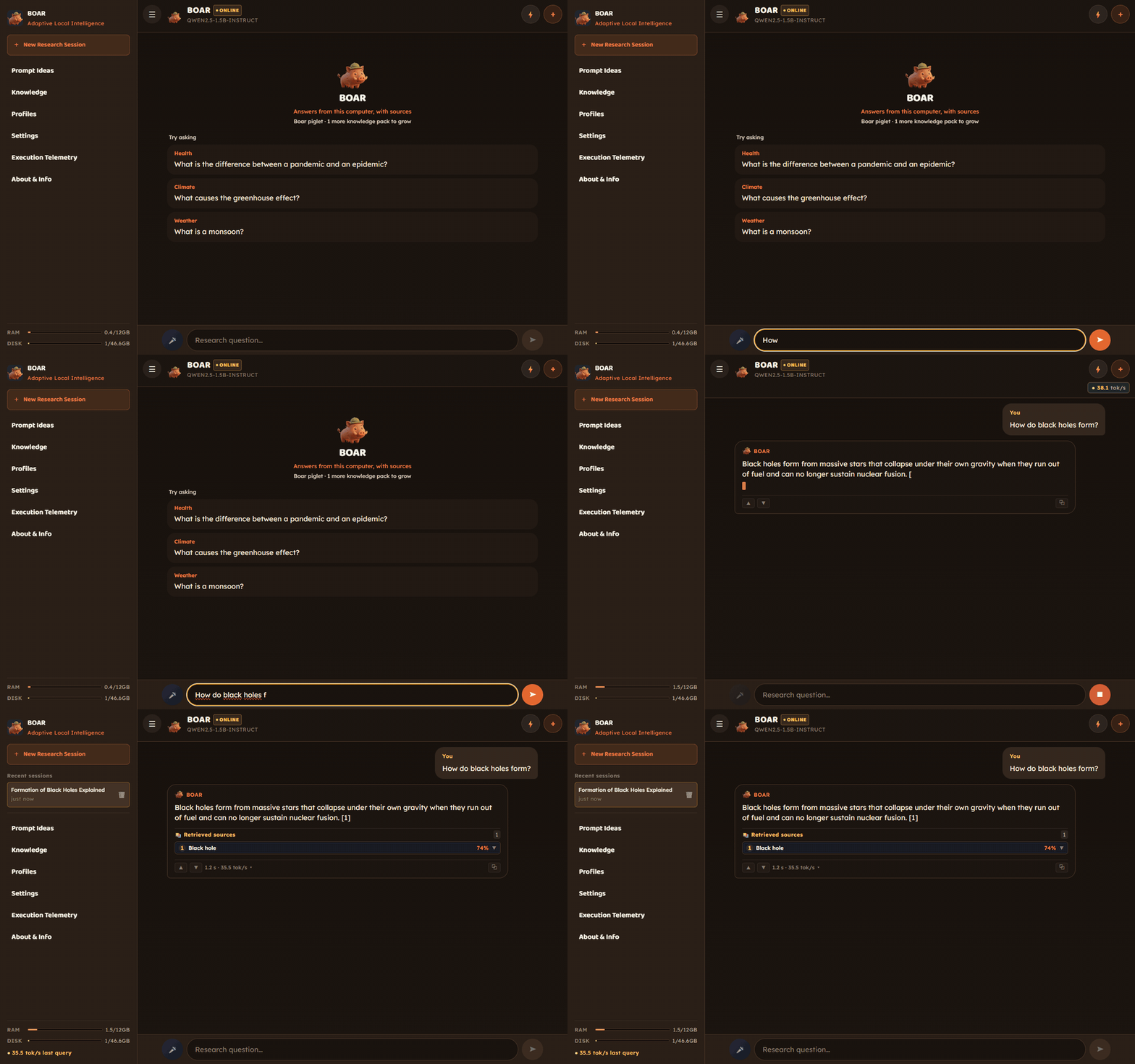
BOAR · a question answered as you watch
A question typed into BOAR on Windows and answered in about a second, with its Wikipedia source listed
~62 tok/son a GTX 1650 graphics card, default model
0requests to any server while it answers
PDFand your own notes become sources
PT · ENinterface and voice

Median of the app's own benchmark (26 questions) on a Windows PC with an NVIDIA GTX 1650 running Qwen2.5-1.5B, 10 October 2026: 62 tok/s, first word after 0.25 s.

Install

Three steps, about a minute

Download and run

BOAR-Setup.exe installs for your user only. No administrator password, and it adds BOAR to the Start menu.

"Windows protected your PC"

The installer isn't digitally signed yet, so SmartScreen shows a blue warning. Click More info, then Run anyway. The code and every build are public on GitHub.

Pick a model, once

The first time, BOAR downloads its AI model (about 1 GB) and builds its library. From then on it works with the internet off.

To check the file, compare its SHA-256 with SHA256SUMS.txt (in PowerShell: Get-FileHash BOAR-Setup.exe). Uninstalling keeps your models and chats in %APPDATA%\BOAR.

First run

One setup, then no internet needed

The first time, the app checks your hardware, downloads the AI model and builds the local library. After that you can switch off Wi-Fi.

  • Shows your RAM and disk before it starts
  • Pick the model: Qwen3-4B (2.5 GB), or the lighter Qwen2.5-1.5B (about 1 GB)
  • Pick how much knowledge to carry, up to 50,000 Wikipedia articles
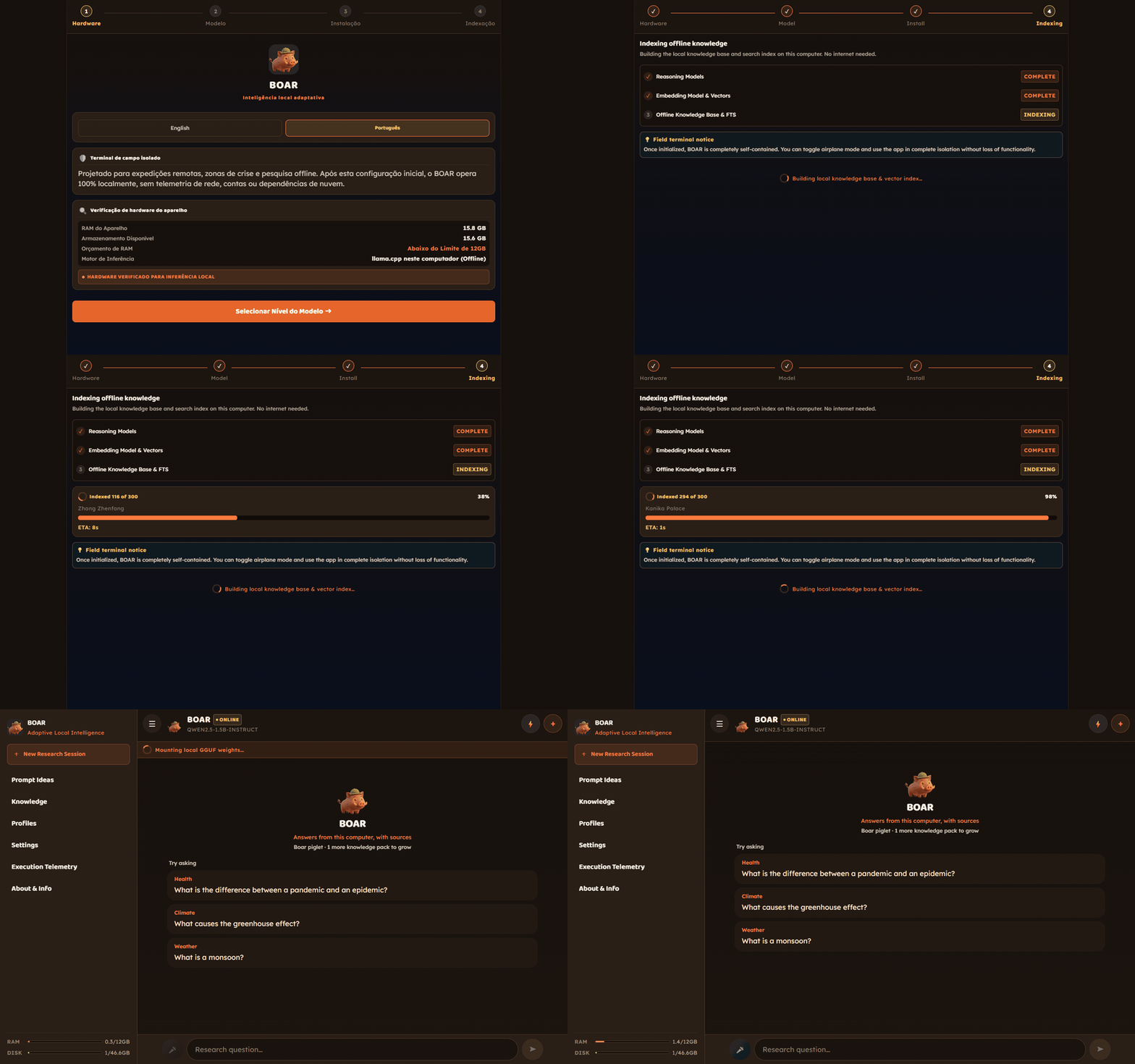
Setup (3× speed)
Setup wizard: hardware check, model and knowledge choice, then indexing the library

Your documents

Import a PDF and ask about it

Field manuals, protocols, your own notes: the file becomes part of the library, and the answer points to where it found the information.

  • PDF, Markdown and plain text
  • Read on the PC itself
  • Every answer shows the source and how closely it matched
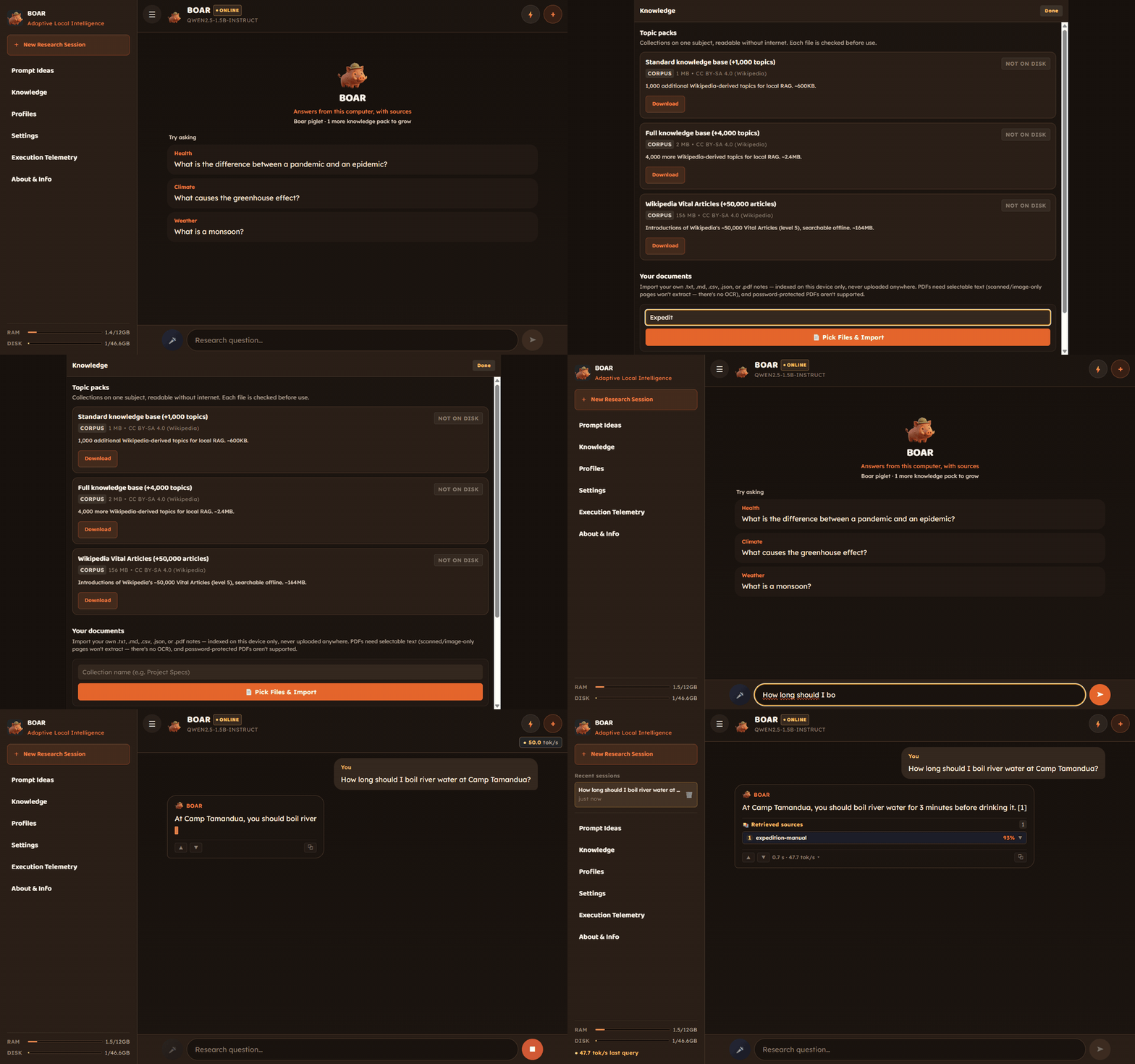
Import a PDF and ask
Importing an expedition manual PDF and getting an answer that cites it

The PDF in this example was made for the demo: "boil river water for 3 minutes at Camp Tamandua".

Built for a big screen

A desktop program, not a stretched phone app

Your conversations in a sidebar, answers in a column made for reading, and the keyboard for everything.

  • Ctrl+N new conversation
  • Ctrl+K ask a question
  • Esc stop the answer
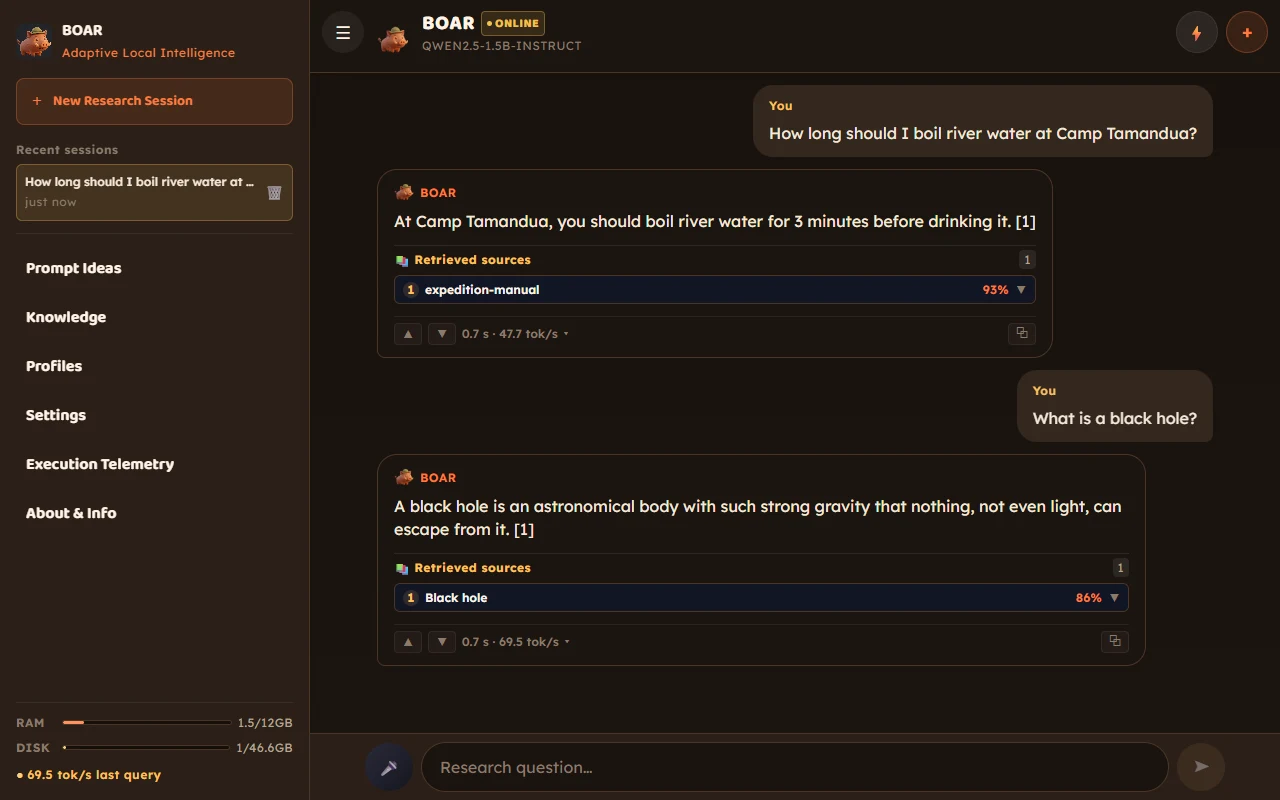
BOAR on Windows
BOAR on Windows: a sidebar with the conversation history and two answers, each with its numbered source

Made for a computer

What only the desktop app does

Voice, offline

Say the question: whisper transcribes Portuguese or English on the PC. The voice model (60 MB) downloads only if you accept it. Answers can be read aloud.

Watched folders

Point BOAR at a folder and new files join the library by themselves, with a notification and a little boar in the system tray.

Profiles

A name, a tone and which collections it may read, applied to a whole conversation. Ask only your contracts, or only your field manuals.

A PIN

Locks the app and encrypts your chats on disk, with a key sealed by the PIN and by your Windows account.

Your library in other AI apps off by default

Claude Desktop, Cursor and other MCP apps can search the collections you choose, read-only, with the source of each passage.

A local API off by default

OpenAI-compatible, on 127.0.0.1 only, with tokens you create in the app. Scripts get BOAR's answers with their sources.

Why it matters

Your questions stay on your machine

Nothing leaves the machine

Questions, documents and answers stay on the computer. The only connections are the downloads you start, like the model the first time.

Works cut off

For an expedition, a crisis zone or a blocked network: after setup, airplane mode changes nothing.

Shows the source

Every answer lists where it came from, so you can check it instead of taking it on trust.

Questions

Before you download

Is it safe to run?

The code is open on GitHub, and every installer is built there by GitHub Actions from a tagged version, with a signed build record. Windows warns because the installer has no paid code-signing certificate yet, not because of anything in it. To check a download: gh attestation verify BOAR-Setup.exe --repo Bielcx/boar-desktop, or compare its SHA-256 with the release's SHA256SUMS.txt.

Do I need a graphics card?

No. Any graphics card with Vulkan (NVIDIA, AMD or Intel) makes answers much faster, and without one BOAR runs on the processor. The default model is about 1 GB.

Does it really work without internet?

Yes, after the first setup. The only connections are the ones you start: downloading a model or a knowledge pack, or searching Hugging Face for other models. No account, no analytics.

Is it free?

Yes, and open source under the MIT license. There's no paid version.

How do I update it?

Download the installer again and run it over the old version. Your models, documents and chats stay.

How do I uninstall it?

Windows Settings › Apps › BOAR › Uninstall. Your data stays in %APPDATA%\BOAR in case you come back; delete that folder to remove it too.

Good to know

What isn't done yet

Windows only for now. Mac and Linux need packaging, and the Mac needs an Apple developer account.

Portuguese is still weaker than English when searching the library. That's the next planned improvement.

The bigger model is slower. Setup recommends Qwen3-4B, which got almost twice as many facts right as Qwen2.5-1.5B in our internal test (15 of 18, against 8; October 2026), but it wants 12 GB of RAM and is fastest with a 4 GB graphics card. On a lighter PC, pick Qwen2.5-1.5B; you can switch later in the app.

The installer isn't digitally signed yet, so Windows shows a warning on the first run (see Install).